TKE Budget
Open from ‘3. Analysis TKE Budget‘.
The turbulent kinetic energy evolves according to the TKE transport equation (Pope, 2000, Ch. 5):
Production represents the rate at which turbulent energy is generated by the interaction of Reynolds stresses with the mean velocity gradients. Convection describes the transport of by the mean flow. Turbulent diffusion redistributes energy in space via triple velocity correlations. Viscous dissipation converts kinetic energy irreversibly into heat at the small scales.
From planar PIV, the dissipation and pressure diffusion cannot be computed directly. uPrime therefore computes a residual (for stationary turbulence with ), which absorbs dissipation and any missing out-of-plane contributions. A non-zero is physically expected and is not an error.
Spatial gradients are computed using central differences with NaN-inpainting near mask boundaries to prevent spurious gradients at wall and shadow edges. Triple correlations for turbulent diffusion are optionally smoothed with a median filter before differentiation to reduce noise amplification.
Reference: Pope, S.B. (2000). Turbulent Flows. Cambridge University Press.
TKE budget terms in uPrime.
| Symbol | Name | Availability |
| Turbulent kinetic energy | Always | |
| Production | Always | |
| Convection | Always | |
| Turbulent diffusion | Always | |
| Residual | Always | |
| Unsteady term | TR data only |
Using the window
In line profile mode the line can be drawn by click-and-drag on the field or set exactly via the – coordinate boxes (v0.7.0; see Figure 3). TKE is always overlaid as a dashed reference line regardless of which budget term is selected. Term-visibility checkboxes (‘P‘, ‘C‘, ‘D‘, ‘R‘) below the plot control which budget terms appear. All four are checked by default; unchecking one hides it without recomputing.
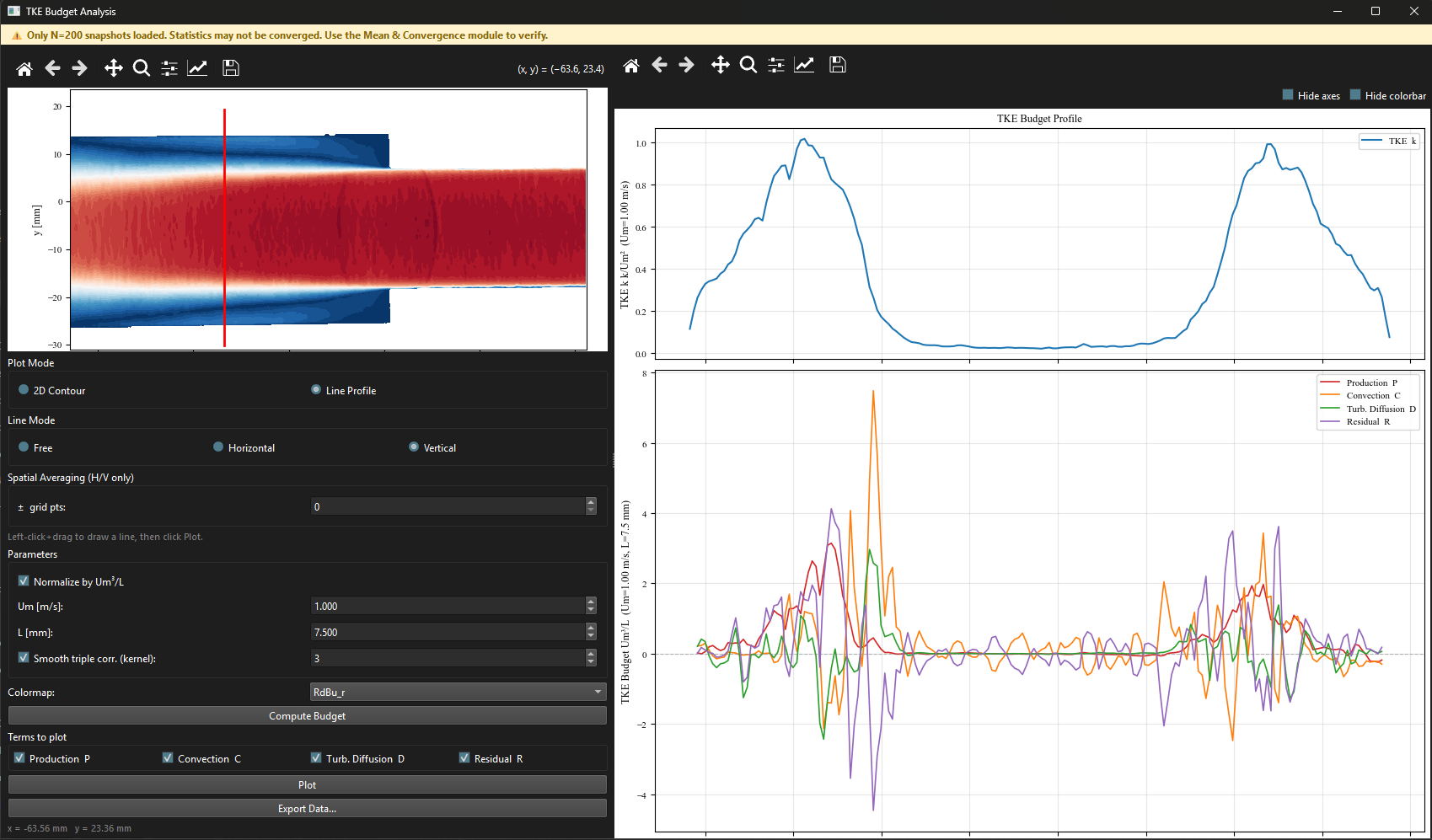
Figure 1:TKE Budget window in line profile mode showing , , , along a vertical line through the shear layer. The four checkboxes below the plot control which terms are visible at any time. The mean field reference is shown in the left panel.
Multi-case comparison
The TKE Budget window supports CSV import and overlay (Chapter ??).
Exporting
Click ‘Export Data…‘ to save all budget terms together in a single file.